




Translation included
Up to 17,000 pages per subscription billing month, under fair use.

AVAILABLE ON iOS & ANDROID
Great stories travel beyond words. Translate your own chapters with context-aware AI, keep the artwork, and read in your language.
Japanese manga. Korean manhwa. Chinese manhua. Comics from everywhere.







Try the comparison
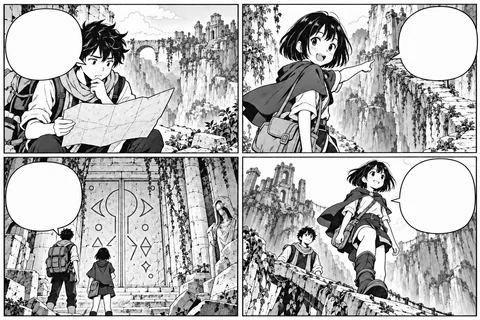
Move across the image to compare the original Japanese with the English translation.
Move your mouse across the image, drag on touch, or use the slider’s arrow keys. Illustrated sample with prepared translations; no page is sent to an AI service.
Bring your own story
A link you found. Pages you saved. An archive on your phone. Bring them into one reading space.
Start from a supported chapter page.
Choose your pages and set their order.
Import a chapter in one file.
Your collection remembers the source language, target language, and reading direction for the next chapter.
See how translation worksTry the mobile editing tools
Choose a text region on the page. The small editing sheet and the enlarged controls work on the same words and style.Compare the original Japanese, cleaned artwork, and English translation. The phone shows a preview of the app’s editing tools.

Translated · tap a bubble or choose a region.
Same tools, enlarged below
Interactive sample with prepared artwork. Original keeps Japanese columns upright and flowing right to left. Clean removes all lettering; your edits stay on this page.
Prepared artwork. Use Original, Clean, and Translated to compare the same page.
Collections & dark mode
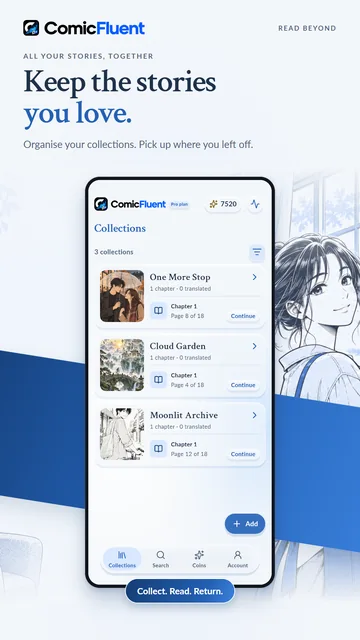
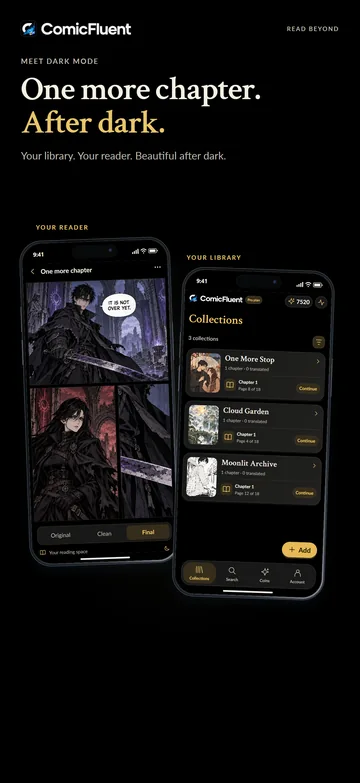
Give your stories a home in Collections. Find the next chapter, return to your reading progress, and switch to dark mode when the world gets quiet.
Earn milestone badges and points that drive the monthly ranking. Join in when you feel like it.
ComicFluent PRO
More pages. More stories.
More room for the chapters you love.
Keep translating, grow your local library, and take your saved stories offline.
Explore Pro & compare plansUp to 17,000 pages per subscription billing month, under fair use.
Go beyond Free’s 30-chapter limit, with local storage subject to device space.
Keep reading without internet while your previously verified Pro access is valid.
Start with Free. Use coins for translation and save up to 30 chapters per device. The same reader and editing tools are included.
After Pro’s included translation allowance, further translations use available in-app coins. Internet is needed for new translations. See fair-use details →
ComicFluent is an AI manga and comic translator for iOS and Android. Translate manga, manhwa, manhua, and comics in 40+ languages, preserve the artwork, edit the lettering, and organize your own chapters.
Paste a supported chapter link, select images, or import a ZIP or CBZ file. Your collection remembers the source language, target language, and reading direction for the next chapter. Use content you have permission to process.
Yes. Start reading as translated pages become ready, follow progress, and compare Original, Clean, and Final views. You can edit the translated text and adjust its lettering.
Choose from 50 translation target languages, including English, Japanese, Korean, Chinese, Spanish, French, Hindi, and Indonesian. You can also change the app interface language in Account settings. Source and target options can differ.
Free uses coins for AI translation and keeps up to 30 saved chapters per device. Pro includes up to 17,000 translation pages per subscription billing month under fair use, offline access to saved chapters while Pro access is valid, and more local chapter storage. After the included allowance, further translations use available in-app coins. Compare plans and coins →
Pro lets you read already saved chapters offline while previously verified Pro access remains valid. Adding chapters from websites and translating new pages still require internet. Your library stays on your device and is not automatically backed up to the cloud.
BEYOND THE BARRIERS
ComicFluent is available now on iOS and Android.
Free to download · In-app purchases · Bring content you have permission to use.